The look on the monitor.
Monitoring LUTs for every stock, so the DP exposes for the negative and the director sees the film on set.
| File | What it shows |
|---|---|
| onelight_500T_Over0.cube | 500T on 2383, camera rated at box speed |
| onelight_500T_Over1.cube | The same, camera rated one stop over |
| onelight_500T_Over1p5.cube | One and a half stops over |
| …_50D, _250D, _200T | The same three for every stock |
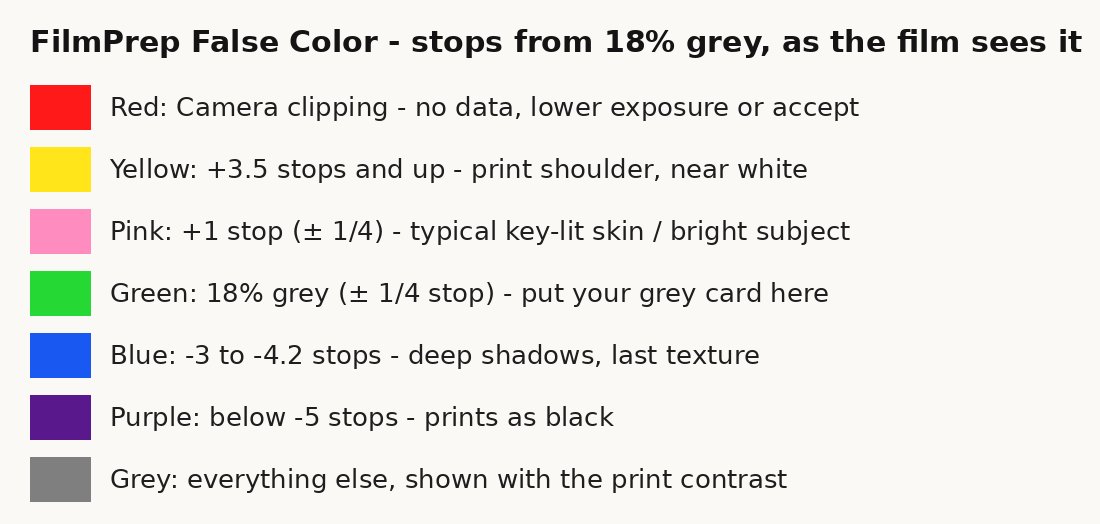
| onelight_FalseColor_Over0/1/1p5.cube | Negative density as false colour, with a legend |
Expose for what you'll get.
If the monitor shows a generic Rec.709 LUT, everyone judges exposure and colour on a picture that will never exist.
onelight's monitoring LUTs are made from the same chain as the plugin: the stock, the print and the camera rating. 15 files fit the 16 user-LUT slots of a Sony FX camera. They don't include grain, halation or weave; those come in the grade.
How to set it up
Download the pack
From your account: four stocks at three ratings, plus false colour.
Load it on camera
Copy the .cube files to the camera or monitor, and choose the stock and rating you're shooting.
Same in the grade
Choose the same stock and Camera Overexposure in onelight. The grade starts where the monitor was.
Tips
Rating
Over1 means the camera was rated one stop over. The LUT prints it back down.
False colour
Blue is thin negative, red is dense. Skin around green-yellow is a good negative.
Log in
The LUTs expect the camera's log. Don't stack them on top of another LUT.
Shot digital. Printed on film.
Try every feature free for 14 days. No card needed.